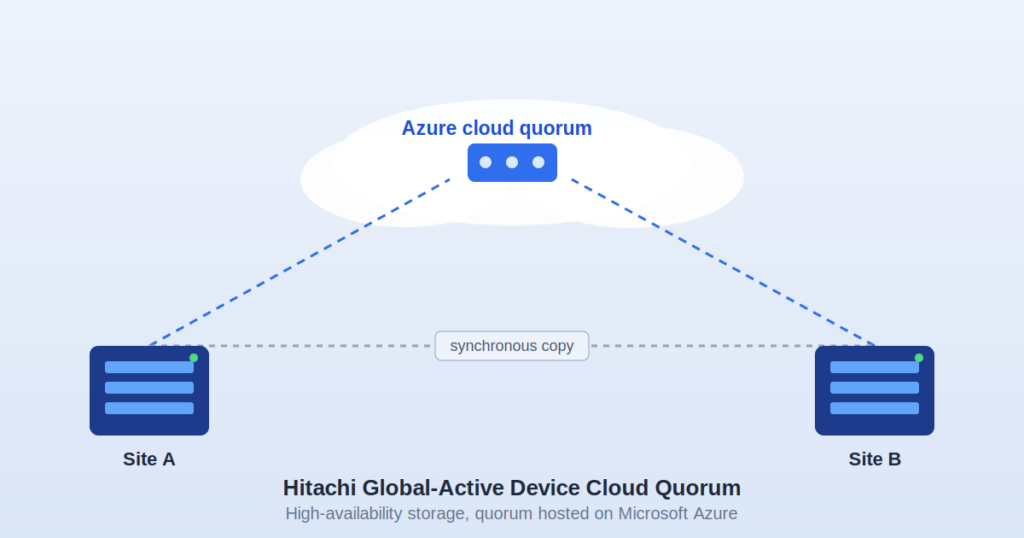
Storage teams running Hitachi Virtual Storage Platform (VSP) systems across two sites eventually run into the same architectural problem: Global-Active Device needs a neutral third party to settle disputes between the two storage arrays when they lose contact with each other. That neutral party is the quorum, and for years the only practical option was a physical box sitting in a third data center. Hitachi’s Cloud Quorum products replace that box with a small virtual machine running in a public cloud. This guide covers what that actually means in practice, how the underlying mechanism works, what the deployment looks like on each supported cloud platform, and where this fits (and doesn’t fit) into a real storage architecture.
What Global-Active Device Actually Does
Global-Active Device is a synchronous, active-active replication feature built into Hitachi VSP arrays — including the VSP E Series and VSP 5000 Series. Two storage systems, typically at two separate locations, present the same LDEV (logical device) to hosts as if it were a single volume. Writes are mirrored between the two arrays before the host receives an acknowledgment, so both copies are always identical at the moment a write completes.
Because both sides are “active” — hosts can read and write to either array — GAD is different from older active-passive replication schemes like TrueCopy, where one side is always the designated primary. This active-active design is what lets a VMware vSphere Metro Storage Cluster (vMSC) or a similar stretched-cluster setup keep running with zero data loss and near-zero downtime if one site drops out entirely.
Why a Two-Node Cluster Needs a Third Vote
Any two-node synchronous cluster has the same unsolved problem: if the link between the two nodes breaks but both nodes are still individually alive, each one has no way of knowing whether the other node is actually down or just unreachable. If both sides decide they’re now the sole survivor and keep accepting writes, you get split-brain — two diverging copies of the same data, which is far worse than an outage.
GAD solves this with a quorum disk that both storage systems can reach independently. When the inter-site link fails, whichever array can still see the quorum disk is allowed to keep serving I/O; the array that has lost contact with both its partner and the quorum disk blocks itself. The quorum disk itself doesn’t store user data — it stores small heartbeat and reservation records that let the two arrays arbitrate control.
Historically this quorum device had to sit at a third, independent site — not co-located with either storage array — connected over Fibre Channel or iSCSI. That’s a real ask: another rack, another power and cooling budget, another set of network links to provision and monitor, often for a device that does almost nothing under normal operation.
What the Cloud Quorum Actually Is
Hitachi’s Cloud Quorum is a small, purpose-built virtual machine image that acts as an iSCSI target and takes over the quorum disk’s job. Instead of a physical array at a third site, the two GAD storage systems connect to this VM over iSCSI across your network (typically via VPN or ExpressRoute/Direct Connect/Cloud Interconnect for production use, since latency and reliability to the quorum matter).
Under the hood, the VM runs SUSE Linux Enterprise Server and uses the Linux targetcli utility to expose a virtual disk as an iSCSI LUN. That’s a meaningful detail most overview pages skip: this isn’t a proprietary Hitachi appliance ported to the cloud — it’s a standard Linux iSCSI target, pre-configured and hardened for this one job, packaged so it deploys with almost no manual setup. On AWS specifically, later revisions moved the underlying OS to SLES 15 SP6 with current security patches as part of a broader refresh.
There are, in fact, two closely related products, and they get conflated:
- Cloud Quorum (the subject of this guide) — deployed in a public cloud (Azure, AWS, or GCP) as the third-site quorum, replacing a physical off-site quorum device entirely.
- Private Cloud Quorum — a separate OVF/OVA-packaged VM meant for on-premises VMware ESXi, for organizations that want an automatically-configured quorum without going to a public cloud at all. Its published reference spec is deliberately light: 1 vCPU, 1 GB of memory, and a 67 GB premium SSD disk, running on ESXi 7.0 U3 or later.
How the Public Cloud Deployment Works
The high-level flow is the same across Azure, AWS, and GCP, with cloud-specific networking details:
- Deploy the VM image from the relevant marketplace (Azure Marketplace, AWS Marketplace, or Google Cloud Marketplace). The image is pre-built — you’re not installing an OS and configuring iSCSI by hand.
- The VM self-configures as an iSCSI target on first boot, with minimal input required from the administrator, which is the main reason deployment time drops from hours to minutes compared to racking a physical quorum box.
- Establish connectivity from both GAD storage systems to the VM’s iSCSI endpoint. This is the part that actually requires planning: stable, low-latency network paths from each storage site to the cloud VM, since the quorum needs to be reachable quickly for arbitration to work correctly during a failure event.
- Register the quorum disk in the GAD configuration on both VSP arrays, exactly as you would with a physical third-site quorum — from the storage system’s perspective, it’s just another iSCSI-attached LUN.
What changes structurally is the topology. A traditional GAD deployment needs:
Site A (VSP) <—- sync copy —-> Site B (VSP) \ / \—- Site C: physical quorum —-/
With Cloud Quorum, Site C becomes a cloud subscription instead of a building:
Site A (VSP) <—- sync copy —-> Site B (VSP) \ / \— Cloud Quorum (Azure/AWS/GCP) —/
No rack space, no third-site power/cooling contract, no dedicated storage array purchase for a device whose only job is to answer heartbeat checks.
Prerequisites Nobody Should Skip
Hitachi’s own product listing is specific about what’s required before you deploy this, and it’s worth stating plainly because it’s easy to assume this is a drop-in fix for any GAD setup:
- Supported Hitachi VSP storage systems on both sides.
- A GAD environment that is already configured and functioning (Cloud Quorum replaces the quorum device, not the GAD relationship itself).
- The required Hitachi software/microcode versions on the storage systems.
- Reliable network connectivity between each storage site and the cloud VM.
- A supported quorum-disk configuration matching Hitachi’s documented specifications.
If any of these aren’t in place, the cloud VM alone won’t get you a working quorum.
Version History and What Changed
Hitachi has iterated on these images rather than leaving them static, which matters if you’re evaluating whether the current build is production-ready:
- The AWS image reached version 2.2.0 with a notable functional addition: dynamic adjustment of the number of quorum devices by resizing the underlying EBS volume, giving more flexibility in how the quorum is scaled without redeploying.
- That same release fixed a bug related to block device ordering that could affect setup reliability — the kind of fix that specifically matters for anyone who hit intermittent deployment failures on earlier builds.
- The base OS was upgraded to SLES 15 SP6 with current security patching, closing the gap on older SUSE builds.
- The Azure listing (hitachivantara.gad_cloud_quorum_v2-0-0) is versioned separately and updates on its own cadence through the Azure Marketplace catalog.
Cost Model
This is a point most overview articles leave out entirely. On AWS, the Global-Active Device Cloud Quorum image itself is free to download from AWS Marketplace — Hitachi doesn’t charge a software license fee for the image. What you pay for is the underlying cloud infrastructure: EC2 compute time for the instance, EBS volume storage for the quorum disk, and any data transfer costs for traffic between your storage sites and the VM. The same general model applies on Azure and GCP — you’re paying your cloud provider for compute and storage consumption, not paying Hitachi a separate quorum-software fee, though the specific instance size and storage tier you choose will determine your actual monthly run cost.
Support is handled through your existing Hitachi Global-Active Device support plan; infrastructure-level issues (the VM not booting, network connectivity to the cloud provider) go through the cloud provider’s own support channel (e.g., AWS Support), while GAD-specific behavior is covered under Hitachi’s support agreement.
On-Premises Quorum vs. Cloud Quorum vs. Private Cloud Quorum
| Physical third-site quorum | Public Cloud Quorum | Private Cloud Quorum (VMware) | |
| Where it runs | Dedicated third-site array/appliance | Azure, AWS, or GCP VM | Local VMware ESXi host |
| Setup time | Days to weeks (procurement, racking, cabling) | Minutes, largely self-configuring | Minutes, OVF/OVA deploy |
| Ongoing cost | Hardware purchase, power, cooling, third-site lease | Cloud compute + storage usage | Existing on-prem VMware capacity |
| Network path | Dedicated storage-grade links (FC/iSCSI) to a third site | iSCSI over VPN/ExpressRoute/Direct Connect/Interconnect | Local network, no external dependency |
| Best fit | Organizations already running a real third site | Organizations without a third site, comfortable depending on a cloud provider for arbitration | Organizations avoiding public cloud dependency but still skipping a physical third-site array |
The trade-off worth sitting with: moving the quorum to a public cloud removes a physical dependency but adds a network dependency on connectivity to that cloud provider. If your link to Azure/AWS/GCP goes down at the same moment your inter-site GAD link has issues, arbitration can’t happen the way it’s supposed to — so the network path to the quorum needs the same seriousness you’d give a physical third-site link, not an afterthought VPN tunnel.
Who This Is Actually Built For
This isn’t a general-purpose cloud backup or DR product — it’s a narrow, specific piece of an existing Hitachi VSP high-availability architecture. It makes sense for:
- Organizations already running Hitachi VSP E Series or VSP 5000 Series storage with GAD configured or being planned.
- Teams running VMware vSphere Metro Storage Cluster on Hitachi storage, where GAD provides the storage layer beneath the stretched cluster.
- Environments in finance, healthcare, and government where data protection and cyber resiliency requirements make a third physical site hard to justify financially but zero-data-loss failover is still mandatory.
- Organizations already committed to Azure, AWS, or GCP for other infrastructure, where adding one more small VM is operationally trivial compared to standing up a third physical site.
It’s not a fit if you don’t already have (or aren’t planning) a GAD environment on supported VSP hardware — this product doesn’t create high availability on its own; it removes one specific piece of friction from a design that already requires GAD.
Where to Get It
- Microsoft Azure Marketplace — listed under Hitachi Vantara’s publisher profile as GAD Cloud Quorum.
- AWS Marketplace — listed as Global-Active Device Cloud Quorum, currently at image version 2.2.0.
- Google Cloud Marketplace — available with equivalent functionality for GCP-based deployments.
Hitachi Vantara has been a Microsoft Technology Alliance Partner and Azure Solutions Partner for over 28 years, and is an OEM partner across Data and AI, Digital and App Innovation, and Infrastructure categories — which is part of why the Azure integration in particular gets regular listing updates rather than being a one-off marketplace entry.
Frequently Asked Questions
Does the Cloud Quorum store any of my actual application data?
No. It only stores small heartbeat and arbitration records used to determine which storage system continues serving I/O during a split. Your application data stays on the two VSP arrays.
Can I use Cloud Quorum without an existing GAD setup?
No — it’s a replacement for the quorum device inside an already-configured (or actively being configured) GAD environment, not a standalone HA product.
What operating system does the quorum VM run?
SUSE Linux Enterprise Server, configured as an iSCSI target using targetcli. Recent AWS builds run SLES 15 SP6.
Is there a licensing fee for the VM image itself?
On AWS, the image is free to download; you pay only for the cloud compute and storage resources it consumes. The general model is similar across Azure and GCP.
What happens if my connection to the cloud provider drops?
If both the inter-site GAD link and the connection to the cloud quorum are down simultaneously, arbitration can’t complete as designed — which is why production deployments need a reliable, monitored network path to the quorum VM, not a best-effort connection.
Is there an alternative for organizations that don’t want a public cloud dependency?
Yes — Hitachi’s Private Cloud Quorum is a separate OVF/OVA image designed to run on a local VMware ESXi host instead of a public cloud, for teams that want to eliminate a physical third-site array without introducing a public cloud dependency.
Leave a Reply